GRANT Privileges in PostgreSQL | Grant Permissions to Roles & Tables
Learn how to use PostgreSQL GRANT to give SELECT, INSERT, UPDATE, DELETE and CONNECT privileges to roles. Includes syntax, common privileges, and practical examples.
📌 What is GRANT in PostgreSQL?
In PostgreSQL, the GRANT command is used to give permissions (privileges) to users (roles) on database objects like tables, schemas, or databases.
👉 In simple words: GRANT = Give access to someone
🎯 Why do we use GRANT?
We use GRANT to:
- 🔐 Control who can access what
-
👨💻 Allow users to perform actions like:
SELECT(read data)INSERT(add data)UPDATE(modify data)DELETE(remove data)
- 🛡️ Improve database security
- 🧑🤝🧑 Support multi-user environments
🧾 Basic Syntax
GRANT privilege(s)
ON object_name
TO role_name;
🧩 Common Privileges
| Privilege | Meaning |
|---|---|
| SELECT | Read data |
| INSERT | Add new rows |
| UPDATE | Modify existing data |
| DELETE | Remove rows |
| ALL | All privileges |
✅ Example
Step 1: Create a user (role)
CREATE ROLE trainee WITH LOGIN PASSWORD '1234';
Step 2: Grant access to a table
GRANT SELECT ON customer TO trainee;
👉 Now trainee can only view data from customer table.
🔄 Multiple Privileges Example
GRANT SELECT, INSERT, UPDATE
ON customer
TO trainee;
👉 Now user can:
- Read
- Add
- Modify data
🌐 Grant on Entire Database
GRANT CONNECT ON DATABASE dvdrental TO trainee;
👉 Allows user to connect to the dvdrental database.
🧠 Important Notes
- You must be owner or superuser to grant permissions.
- Permissions can be revoked using
REVOKE. - Roles can be users or groups.
🧪 Practical Lab Exercise (Beginner Friendly)
🎯 Objective:
Learn how to control access using GRANT.
🔹 Task 1: Create a Role
CREATE ROLE student1 WITH LOGIN PASSWORD 'pass123';
🔹 Task 2: Grant Database Access
GRANT CONNECT ON DATABASE dvdrental TO student1;
🔹 Task 3: Grant Read Access
GRANT SELECT ON film TO student1;
👉 Test: Login as student1 and run:
SELECT * FROM film;
🔹 Task 4: Try Restricted Action
INSERT INTO film(title) VALUES ('Test Movie');
❌ This should fail (no INSERT permission)
🔹 Task 5: Grant INSERT Permission
GRANT INSERT ON film TO student1;
👉 Try INSERT again → ✅ Should work
🔹 Task 6: Grant All Permissions
GRANT ALL ON film TO student1;
🔹 Challenge Task 💡
- Create another role
viewer - Allow only SELECT on
actortable - Block all other operations
🧾 Summary
GRANT= Give permission- Used for security & access control
- Works on tables, databases, schemas
- Helps manage multiple users safely
Below is a complete step-by-step real-world university system scenario showing:
✔ Database creation ✔ Table design ✔ Role creation ✔ GRANT usage (security layer) ✔ Testing access like a real system
Using PostgreSQL
🎓 University System with GRANT (Step-by-Step Lab)
🏁 Goal
We will build a small University Database System where:
- Students can only view data
- Teachers can manage marks
- Admin controls everything using GRANT
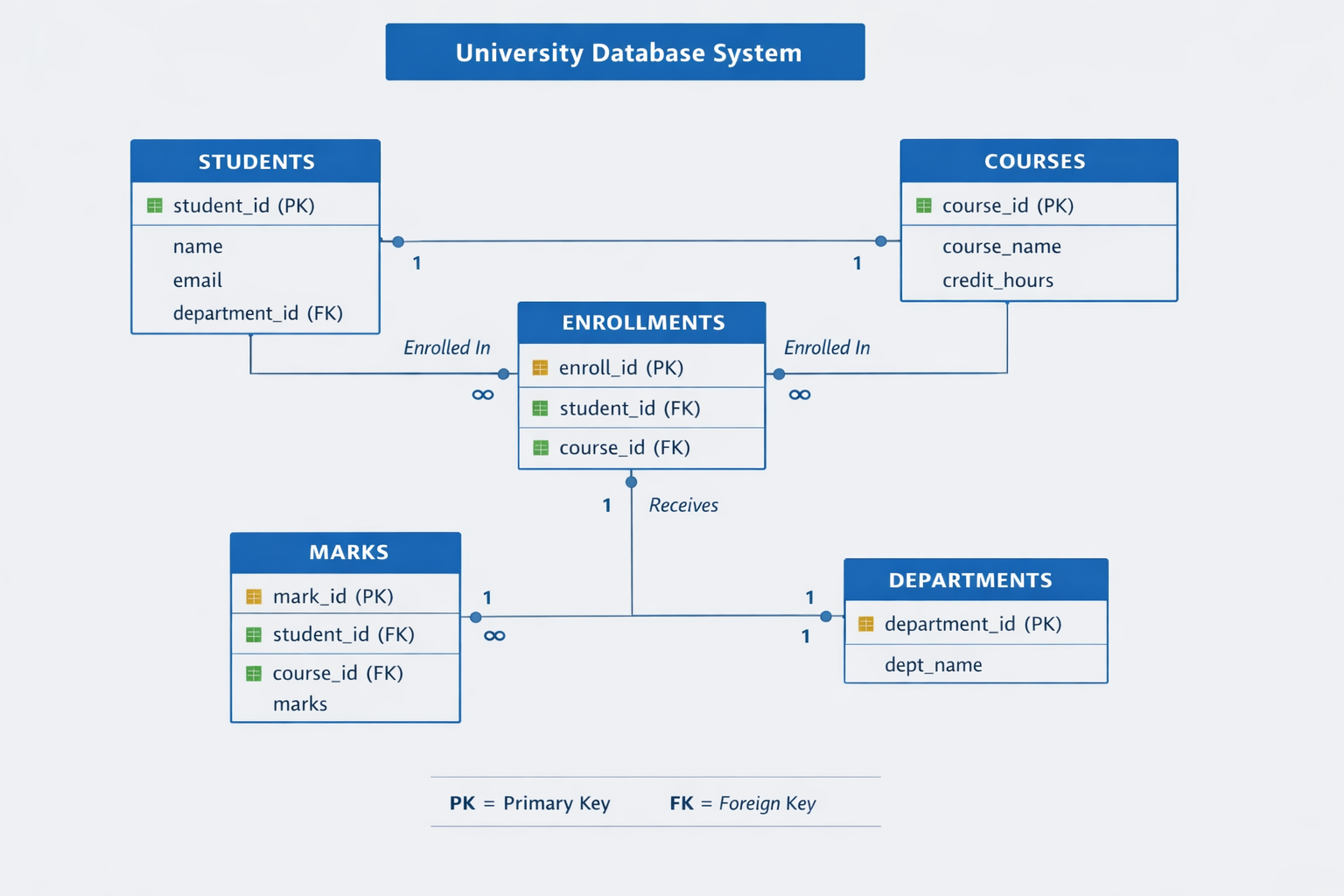
ERD Diagram for University Database System
🧱 STEP 1: Create Database
CREATE DATABASE university_db;
👉 Now connect to database:
\c university_db
🏗️ STEP 2: Create Main Tables
📘 2.1 Students Table
CREATE TABLE students (
    student_id SERIAL PRIMARY KEY,
    name VARCHAR(100),
    department VARCHAR(50),
    email VARCHAR(100)
);
📘 2.2 Courses Table
CREATE TABLE courses (
    course_id SERIAL PRIMARY KEY,
    course_name VARCHAR(100),
    credit_hours INT
);
📘 2.3 Enrollments Table
CREATE TABLE enrollments (
    enroll_id SERIAL PRIMARY KEY,
    student_id INT REFERENCES students(student_id),
    course_id INT REFERENCES courses(course_id)
);
📘 2.4 Marks Table
CREATE TABLE marks (
    mark_id SERIAL PRIMARY KEY,
    student_id INT REFERENCES students(student_id),
    course_id INT REFERENCES courses(course_id),
    marks INT
);
👥 STEP 3: Create Roles (Users)
🎓 Student Role
CREATE ROLE student WITH LOGIN PASSWORD '123';
👨🏫 Teacher Role
CREATE ROLE teacher WITH LOGIN PASSWORD '123';
🧑💼 Admin Role
CREATE ROLE admin WITH LOGIN PASSWORD 'admin123';
🔐 STEP 4: Grant Database Access
Allow connection to database
GRANT CONNECT ON DATABASE university_db TO student;
GRANT CONNECT ON DATABASE university_db TO teacher;
GRANT CONNECT ON DATABASE university_db TO admin;
📊 STEP 5: GRANT Permissions (Core Security)
🎓 5.1 Student Permissions (Read Only)
GRANT SELECT ON students TO student;
GRANT SELECT ON courses TO student;
GRANT SELECT ON enrollments TO student;
GRANT SELECT ON marks TO student;
👉 Students can ONLY VIEW data
❌ Cannot insert/update/delete
👨🏫 5.2 Teacher Permissions
GRANT SELECT ON students TO teacher;
GRANT SELECT ON courses TO teacher;
GRANT SELECT ON enrollments TO teacher;
Teachers can manage marks:
GRANT SELECT, INSERT, UPDATE ON marks TO teacher;
🧑💼 5.3 Admin Permissions (Full Control)
GRANT ALL PRIVILEGES ON students TO admin;
GRANT ALL PRIVILEGES ON courses TO admin;
GRANT ALL PRIVILEGES ON enrollments TO admin;
GRANT ALL PRIVILEGES ON marks TO admin;
🧪 STEP 6: Insert Sample Data (Admin Role)
INSERT INTO students (name, department, email)
VALUES
('Ali Khan', 'CS', 'ali@uni.edu'),
('Sara Ahmed', 'IT', 'sara@uni.edu');
INSERT INTO courses (course_name, credit_hours)
VALUES
('Database Systems', 3),
('Web Development', 4);
👨🎓 STEP 7: Testing Role Access
🔐 Login as Student
SELECT * FROM students;
✔ Allowed
❌ Try Insert (Should FAIL)
INSERT INTO students(name, department, email)
VALUES ('Test Student', 'CS', 'test@uni.edu');
👉 ERROR: permission denied
👨🏫 Login as Teacher
✔ View students
SELECT * FROM students;
✔ Insert marks
INSERT INTO marks(student_id, course_id, marks)
VALUES (1, 1, 85);
✔ Update marks
UPDATE marks
SET marks = 90
WHERE student_id = 1;
🧑💼 Login as Admin
Full control:
DELETE FROM students WHERE student_id = 2;
✔ Works
🧠 STEP 8: How GRANT Works (Concept)
Think of it like a University Gate System:
| Role | Access Level |
|---|---|
| Student | Read only (library access) |
| Teacher | Edit marks + view data |
| Admin | Full control (system owner) |
🔐 STEP 9: Security Logic (Important)
✔ GRANT = give permission ✔ REVOKE = remove permission ✔ Roles = users or groups
👉 Without GRANT: Users cannot even see tables
📌 FINAL SUMMARY
In this real-world university system:
✔ Database created ✔ Tables designed ✔ Roles created ✔ Permissions assigned using GRANT ✔ Access controlled by role type