C++ One-Dimensional Arrays — Syntax & Examples
Beginner-friendly guide to C++ one-dimensional arrays: declaration, initialization, indexing, accessing elements, loops, and practical examples.
🔹 What is an Array?
An array is a collection of multiple values of the same data type stored in continuous memory locations under one variable name.
👉 Instead of creating many variables, we use an array.
Example:
int marks[5];
This stores 5 integer values.
🔹 One-Dimensional Array
A one-dimensional array stores data in a single line (row).
📌 Syntax:
data_type array_name[size];
🔹 Declaring a One-Dimensional Array
Declaration means reserving memory for the array.
Example:
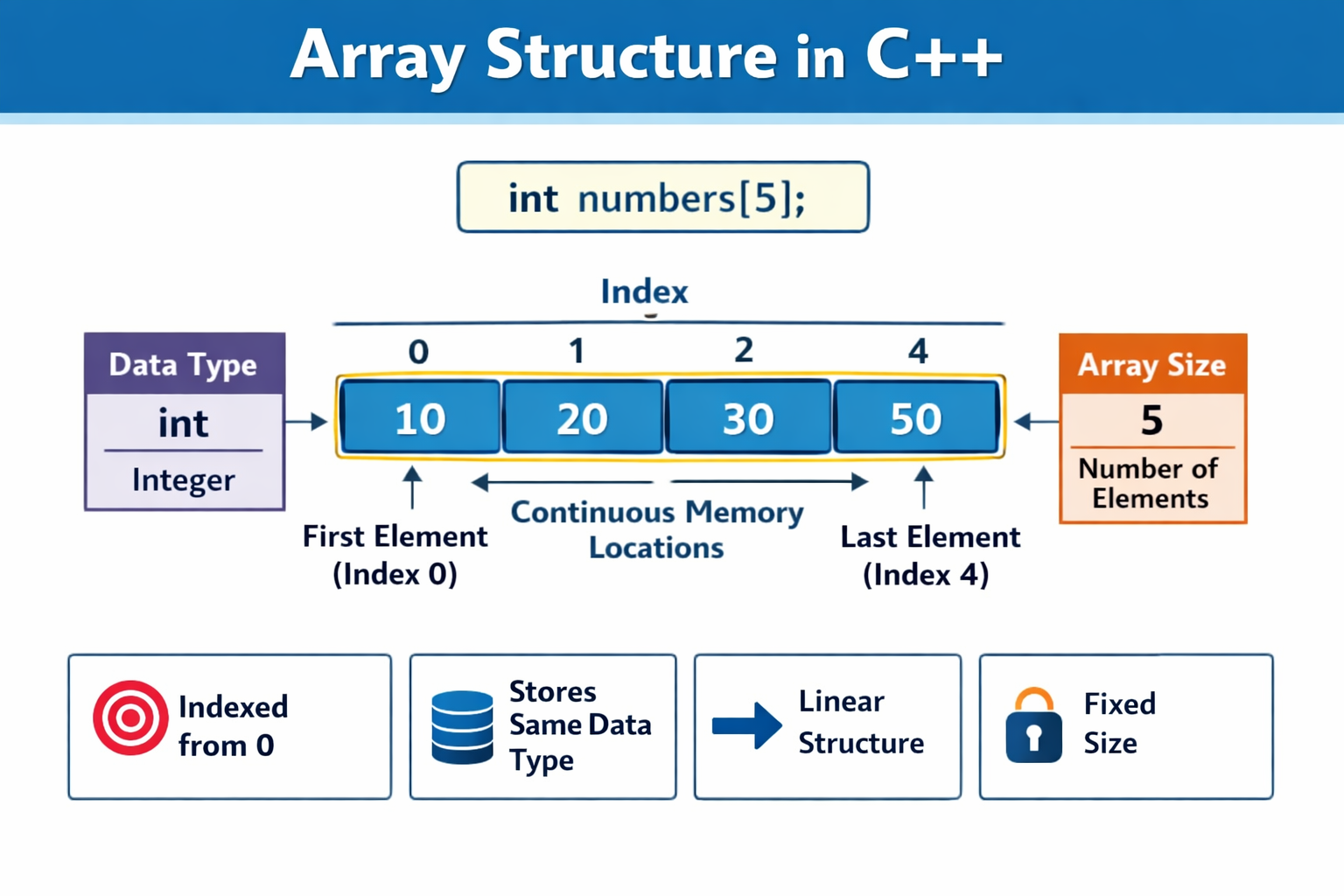
int numbers[5];
📌 This creates an array named numbers that can store 5 integers.
🔹 Array Initialization
Initialization means assigning values to the array.
Method 1: Initialize at Declaration
int numbers[5] = {10, 20, 30, 40, 50};
Method 2: Let Compiler Count Size
int numbers[] = {5, 10, 15, 20};
Method 3: Initialize One by One
int numbers[3];
numbers[0] = 10;
numbers[1] = 20;
numbers[2] = 30;
🔹 Index Number (Very Important)
- Array index starts from 0
- Last index =
size - 1
| Index | Value |
|---|---|
| 0 | First element |
| 1 | Second element |
| 2 | Third element |
🔹 Accessing Individual Elements
We use index number to access elements.
Example:
int numbers[5] = {10, 20, 30, 40, 50};

cout << numbers[0]; // Output: 10
cout << numbers[3]; // Output: 40
📌 Example: Assigning Value to Individual Array Elements
#include <iostream>
using namespace std;

int main() {
    int numbers[5];   // Array declaration

    // Assigning values to individual elements
    numbers[0] = 10;
    numbers[1] = 20;
    numbers[2] = 30;
    numbers[3] = 40;
    numbers[4] = 50;

    // Displaying values
    cout << numbers[0] << endl;
    cout << numbers[1] << endl;
    cout << numbers[2] << endl;
    cout << numbers[3] << endl;
    cout << numbers[4] << endl;

    return 0;
}
🔍 Explanation
int numbers[5];→ creates an array of size 5numbers[0] = 10;→ assigns 10 to the first elementnumbers[1] = 20;→ assigns 20 to the second element- Index starts from 0, not 1
- Each element is accessed using array name + index
📘 Memory View (Simple)
| Index | Value |
|---|---|
| 0 | 10 |
| 1 | 20 |
| 2 | 30 |
| 3 | 40 |
| 4 | 50 |
🔹 Accessing Array Elements Using for Loop
The for loop is best for accessing array elements.
Example:
#include <iostream>
using namespace std;

int main() {
    int numbers[5] = {10, 20, 30, 40, 50};

    for(int i = 0; i < 5; i++) {
        cout << numbers[i] << endl;
    }
    return 0;
}
📌 i represents the index number.
🔹 Example 1: Print Student Marks
Problem:
Store and display marks of 5 students.
#include <iostream>
using namespace std;

int main() {
    int marks[5] = {78, 85, 90, 66, 88};

    for(int i = 0; i < 5; i++) {
        cout << "Student " << i+1 << " Marks: " << marks[i] << endl;
    }

    return 0;
}
🔹 Example 2: Sum of Array Elements
Problem:
Find sum of array values.
#include <iostream>
using namespace std;

int main() {
    int numbers[5] = {10, 20, 30, 40, 50};
    int sum = 0;

    for(int i = 0; i < 5; i++) {
        sum = sum + numbers[i];
    }

    cout << "Sum = " << sum;

    return 0;
}
🔹 Example 3: Store and Display Marks of Students
#include <iostream>
using namespace std;

int main() {
    int marks[5];   // Declare an array of size 5

    // Taking input
    cout << "Enter marks of 5 students:" << endl;
    for(int i = 0; i < 5; i++) {
        cin >> marks[i];
    }

    // Displaying output
    cout << "Marks of students are:" << endl;
    for(int i = 0; i < 5; i++) {
        cout << marks[i] << endl;
    }

    return 0;
}
🔍 Explanation (Very Simple)
1️⃣ Array Declaration
int marks[5];
int→ data typemarks→ array name5→ size (number of elements)
2️⃣ Taking Input Using for Loop
for(int i = 0; i < 5; i++) {
    cin >> marks[i];
}
iis the index- Index starts from 0
- Values are stored one by one
3️⃣ Displaying Array Values
for(int i = 0; i < 5; i++) {
    cout << marks[i] << endl;
}
- Prints each element of the array
📊 How Data is Stored
| Index | Value |
|---|---|
| 0 | marks of student 1 |
| 1 | marks of student 2 |
| 2 | marks of student 3 |
| 3 | marks of student 4 |
| 4 | marks of student 5 |
🔹 Example 4: Find the Sum of Numbers Using an Array
💡 Problem Statement
Store 5 numbers in an array and calculate their sum.
✅ Program:
#include <iostream>
using namespace std;

int main() {
    int numbers[5];
    int sum = 0;

    // Taking input
    cout << "Enter 5 numbers:" << endl;
    for(int i = 0; i < 5; i++) {
        cin >> numbers[i];
    }

    // Calculating sum
    for(int i = 0; i < 5; i++) {
        sum = sum + numbers[i];
    }

    // Displaying result
    cout << "Sum of numbers = " << sum << endl;

    return 0;
}
🔍 Explanation (Simple Words)
1️⃣ Array Declaration
int numbers[5];
Creates an array to store 5 integers.
2️⃣ Input Using Loop
- Values stored in:
numbers[0] to numbers[4]
3️⃣ Sum Calculation
sum = sum + numbers[i];
Adds each element to sum.
📊 Example Input / Output
Input:
10 20 30 40 50
Output:
Sum of numbers = 150
📘 Related Topics
- C++ Array Length — How to Get Array Size with sizeof & std::size
- C++ Structures (struct) — Definition, Initialization & Best Practices