C++ Structures (struct) — Definition, Initialization & Best Practices
Learn how to define and use struct in C++: syntax, initialization, member access, struct vs class, passing by value/reference, and common best practices for safe, efficient structs.
🔷 What is a Structure in C++?
A structure (struct) in C++ is a user-defined data type that allows you to store different types of data under one name.
👉 It is useful when you want to group related data together.
Example (Real Life):
A Student has:
- Roll number (int)
- Name (string)
- Marks (float)
All these can be grouped using a structure.
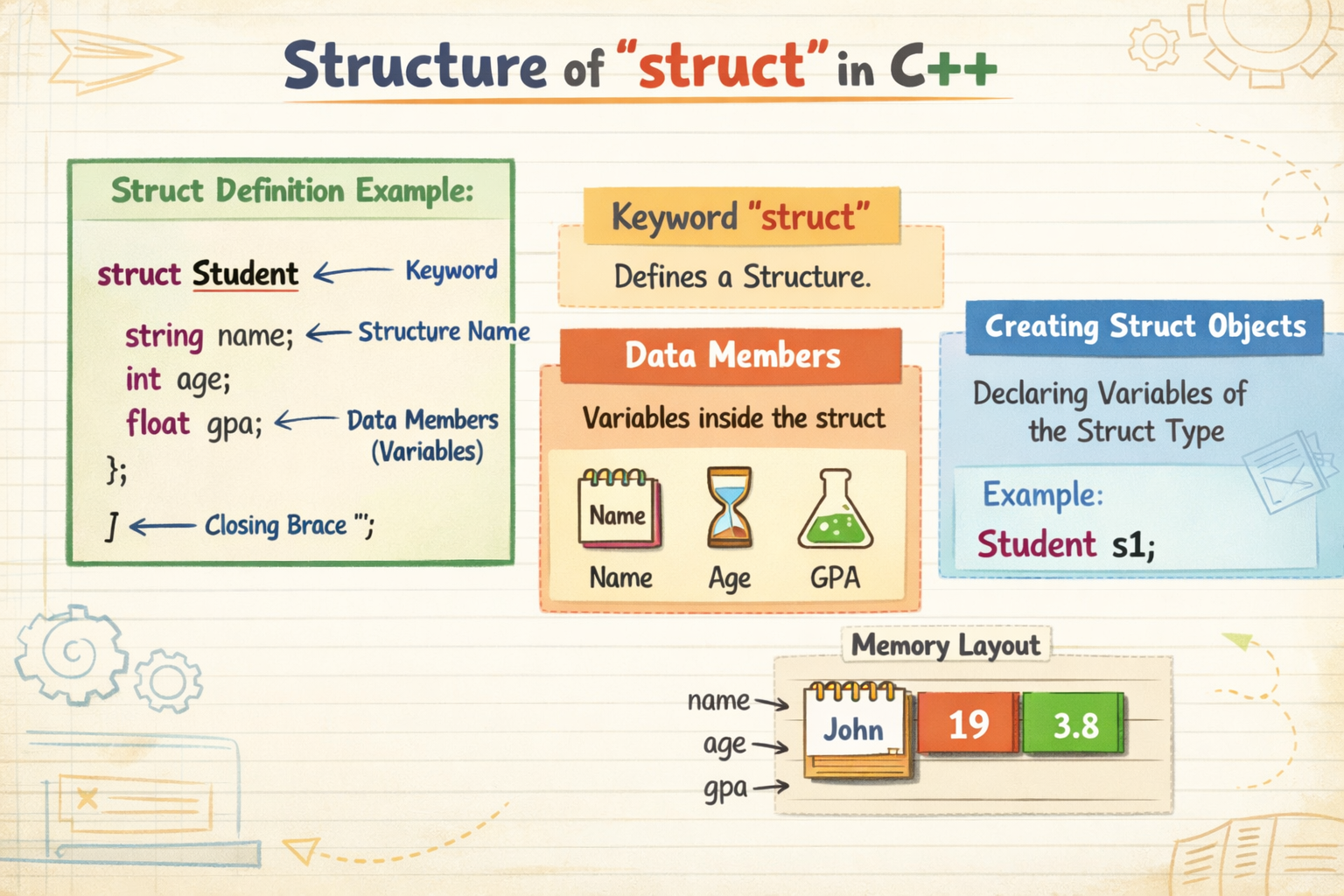
🔷 Declaring a Structure
Syntax:
struct StructureName {
    dataType member1;
    dataType member2;
};
Example:
struct Student {
    int rollNo;
    string name;
    float marks;
};
✔ This only defines the structure, no memory is allocated yet.
🔷 Defining Structure Variables
After declaring a structure, you can create variables of that structure.
Example:
Student s1;
Now s1 can store student data.
🔷 Accessing Structure Members
Use the dot (.) operator to access members.
Example:
#include <iostream>
using namespace std;

struct Student {
    int rollNo;
    string name;
    float marks;
};

int main() {
    Student s1;

    s1.rollNo = 101;
    s1.name = "Ali";
    s1.marks = 85.5;

    cout << s1.rollNo << endl;
    cout << s1.name << endl;
    cout << s1.marks << endl;

    return 0;
}
🔷 Initializing Structure Variables
Method 1: Initialization at declaration
Student s1 = {101, "Ahmed", 90.5};
Method 2: Member-wise initialization
Student s1;
s1.rollNo = 102;
s1.name = "Sara";
s1.marks = 88.0;
🔷 Assigning One Structure Variable to Another
In C++, you can directly assign one structure to another of the same type.
Example:
Student s1 = {101, "Ali", 85};
Student s2;

s2 = s1;   // Copy all values

cout << s2.name;   // Output: Ali
✔ All members are copied automatically.
🔷 Array as Members of Structure
A structure member can also be an array.
Example:
struct Student {
    int rollNo;
    char name[20];
    int marks[3];
};
Example Program:
#include <iostream>
using namespace std;

struct Student {
    int rollNo;
    char name[20];
    int marks[3];
};

int main() {
    Student s1;

    s1.rollNo = 101;
    strcpy(s1.name, "Ali");

    s1.marks[0] = 80;
    s1.marks[1] = 75;
    s1.marks[2] = 90;

    cout << "Roll No: " << s1.rollNo << endl;
    cout << "Name: " << s1.name << endl;

    cout << "Marks: ";
    for(int i = 0; i < 3; i++) {
        cout << s1.marks[i] << " ";
    }

    return 0;
}
🔷 Structure with Array of Structures (Common Use)
Student students[2] = {
    {101, "Ali", 85},
    {102, "Sara", 90}
};
🔷 Why Use Structures?
✔ Group related data ✔ Improve code readability ✔ Used in real-world data (students, employees, products) ✔ Foundation for classes in OOP
🔷 Key Points
structgroups different data types- Access members using dot (
.) - Structures can be copied directly
- Structures can contain arrays
- Structures make programs organized and meaningful
🔷 Example: Structure for Book Information
📘 Problem Statement
Store and display information of a book using structure.
🔷 Step 1: Declare the Structure
struct Book {
    int bookId;
    string title;
    float price;
};
🔷 Step 2: Complete Program Example
#include <iostream>
using namespace std;

struct Book {
    int bookId;
    string title;
    float price;
};

int main() {
    // Defining structure variable
    Book b1;

    // Assigning values
    b1.bookId = 1;
    b1.title = "C++ Basics";
    b1.price = 550.75;

    // Displaying values
    cout << "Book ID: " << b1.bookId << endl;
    cout << "Title: " << b1.title << endl;
    cout << "Price: " << b1.price << endl;

    return 0;
}
🔷 Output
Book ID: 1
Title: C++ Basics
Price: 550.75
🔷 Example with Initialization at Declaration
Book b2 = {2, "Programming Fundamentals", 620.50};

cout << b2.bookId << endl;
cout << b2.title << endl;
cout << b2.price << endl;
🔷 Example: Assigning One Structure to Another
Book b3;
b3 = b2;   // Copy all data

cout << b3.title;   // Output: Programming Fundamentals
🔷 Example: Structure for Employee Information
📌 Problem Statement
Store and display employee details using a structure.
🔷 Step 1: Declare the Structure
struct Employee {
    int empId;
    string name;
    float salary;
};
🔷 Step 2: Complete Program
#include <iostream>
using namespace std;

struct Employee {
    int empId;
    string name;
    float salary;
};

int main() {
    // Defining structure variable
    Employee e1;

    // Assigning values
    e1.empId = 1001;
    e1.name = "Ahmed";
    e1.salary = 45000.50;

    // Displaying values
    cout << "Employee ID: " << e1.empId << endl;
    cout << "Employee Name: " << e1.name << endl;
    cout << "Employee Salary: " << e1.salary << endl;

    return 0;
}
🔷 Output
Employee ID: 1001
Employee Name: Ahmed
Employee Salary: 45000.5
🔷 Example with Initialization at Declaration
Employee e2 = {1002, "Sara", 52000};
🔷 Example: Copying One Structure Variable to Another
Employee e3;
e3 = e1;   // Copy data

cout << e3.name;   // Output: Ahmed